.png?width=200&height=98&name=Horizontal%20PVFARM%20Logo%20(Small).png)
Smart DXF Import Mapping
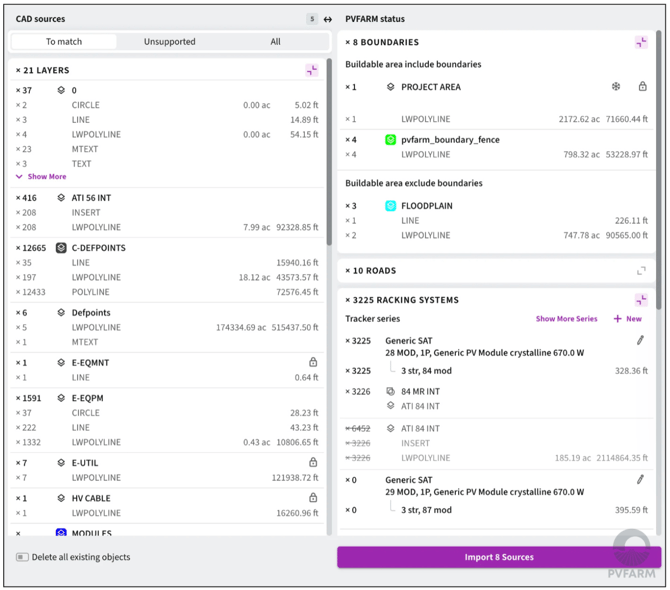
Importing CAD layouts is now faster to review and easier to control. You don’t have to prepare the file by renaming its objects in advance. Instead, PVFARM accepts it as is, analyzes the DXF structure, suggests what each source is likely to represent, and pre-maps recognized objects before import.
- Review parsed CAD sources and their proposed PVFARM targets in one mapping UI.
- Keep full control over the result: accept the suggested mapping or change it manually before importing.
- Preview shapes from the imported layout in the realtime.
More Control over Low Voltage Wiring
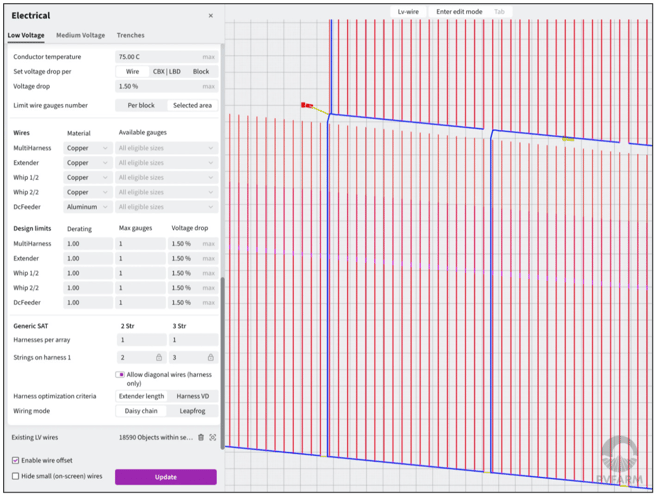
LV design now gives teams more control over circuit grouping, cable sizing, loss analysis, and equipment placement without forcing every project through the same automatic setup.
- Set an exact number of active CBX/LBD circuits per block, or use PVFARM’s automatic grouping.
- Configure the allowed cable materials and sizes.
- Apply voltage-drop requirements per wire, per CBX/LBD circuit, or per block.
- Adjust derating factor.
- Review LV loss and sizing results block by block.
- See cable quantities grouped by cable type in boundary quantity results.
- Improved placement moves less-loaded combiner boxes toward block edges to help reduce voltage drop.
Other Improvements
- Export north–south and east–west terrain slope maps to CAD for further analysis.
- Use simple arithmetic directly in supported numeric fields for Equipment properties.
- Choose how harnesses are placed on a tracker: minimize electrical losses by placing higher-current harnesses closer to the combiner side, or minimize the total extender cable length.
- Open polylines can now be imported as shadewalls with editable height.
- DXF export is now compatible with ZWCAD.
- The “new-version” notification now makes it clear when an application update is available.