.png?width=200&height=98&name=Horizontal%20PVFARM%20Logo%20(Small).png)
-
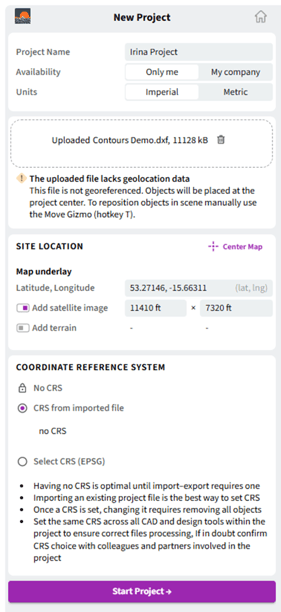
Select the Units you will use
-
Drag and drop your project files
-
The warning icon (!) indicates missing or required information
-
Check the coordinates of your project (Latitude, Longitude)
-
If you want to visualize the selected location using a Google Maps image, enable “Add satellite image”
-
Turn off “Add terrain” because you are importing a 3D project file
-
Use the same CRS as your imported file. If no CRS is detected, follow the table 1: “Typical CRS” to select the correct one
-
After completing all required fields, click “Start Project”
-
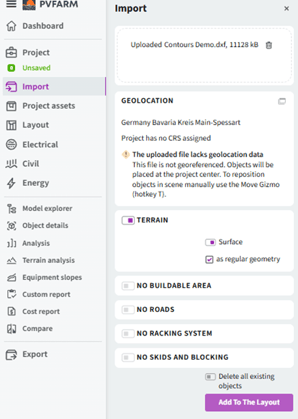
The warning icon (!) indicates missing or required information
-
The enabled elements are those that PVFARM recognized from your imported file
-
The disabled elements are those that PVFARM did not detect in your imported file
-Result in PVFARM after importing the terrain file
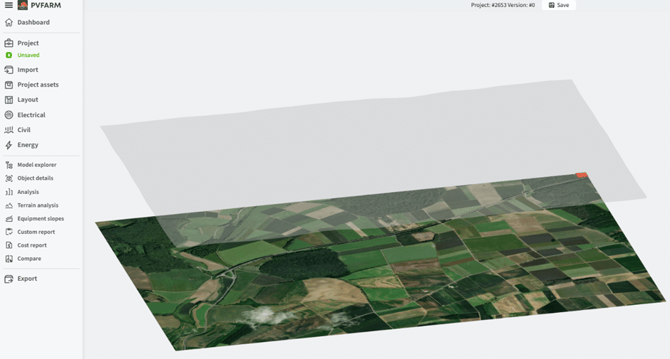
Note: -confirm that all required settings are configured correctly. Refer to Verify rule