.png?width=200&height=98&name=Horizontal%20PVFARM%20Logo%20(Small).png)
Point of Interconnect (POI)
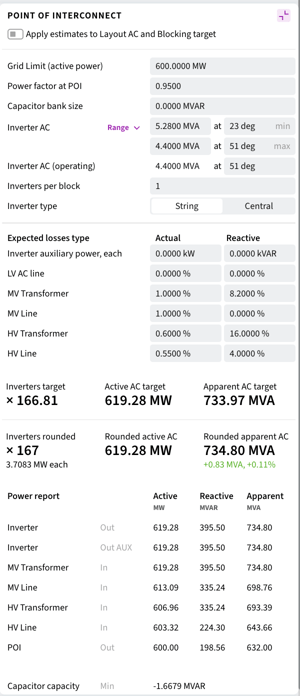
Reverse Power Calculation from Point of Interconnect (POI):
You can now calculate the required inverter AC output power and the exact number of inverter needed based on target active power at the Point of Interconnect. The algorithm accounts for losses between the inverter and the POI, helping to prevent equipment undersizing or oversizing during the design phase.
Inverter Load Ratio (ILR) Optimization:
A new tool has been added to determine the cost-optimal Inverter Load Ratio (ILR). Based on the cost of the selected inverter, the system calculates the ILR value that targets the minimum Levelized Cost of Energy (LCOE).
-2.png?width=300&height=419&name=image%20(1)-2.png)
Maximize DC
Maximize DC is a new layout generation mode that maximizes DC yield with fewer constraints than the existing Maximize Capacity option (renamed into “Partial Alignment”). It's built for dense, irregular site shapes where squeezing out every panel matters.
Unlike other generation modes, Maximize DC works with roads already placed in the scene rather than generating new ones. Existing roads are treated as hard constraints — the layout fills around them.
-1.png?width=668&height=360&name=image%20(2)-1.png)
Layout: Blocking & Modeling Improvements
Manual Blocking
The highest-friction manual blocking task — reassigning a tracker to a different block — is now a direct interaction:
- Select a block/skid; it colorizes and everything else ghosts.
- Select trackers to assign them to that block.
- Live ILR and tracker count update as assignments are made.
Manual layout editing in PVFARM now has a structured interaction model — a select-act pattern consistent across all tools, with snapping infrastructure that makes precise placement practical.
Move / Copy
What was previously known as a Transform gizmo got a new home. The hotkey is the same (T) but now it’s conveniently placed on a toolbar.
By activating it and moving the object, user can change its position or rotation. Pressing Ctrl or Cmd hotkey will create a copy of the original object and move it instead.
-1.png?width=629&height=395&name=image%20(3)-1.png)
Snapping
Together with the Move tool, it allows to achieve precise positioning according to most common spacing options:
- Pitch / GCR — row-to-row spacing defined in the Layout Panel
- Array offset — array offset
- Block offset — block clearance distances
- Road clearance — road setback distance
- Skid setback — substation setback constraints
Each offset can be toggled on and off, distance can be modified and it is already set to default values from the layout settings.
-1.png?width=670&height=320&name=image%20(4)-1.png)
There is a post-snapping tooltip showing which line the snapping happened to and what the offset distance is.
-1.png?width=670&height=355&name=image%20(5)-1.png)
Snapping is intended to be used before placing equipment on the ground, because rotation distorts equipment projections that reduces final precision.
Series for Fixed Tilt Racking Systems
FT configuration has been redesigned to reach parity with the SAT interface — the same Series architecture, the same structural logic, the same creation experience.
- FT assets are now organized as Series, matching the SAT model users are already familiar with.
- A new FT creation Wizard streamlines initial setup and reduces configuration errors.
- A dedicated PV Module section groups module-related properties separately from racking configuration.
- Several previously manual inputs are now automated or assigned safer default values.
- The catalog is split into Racking Systems and Electrical categories to handle growing asset lists cleanly.
MV Configurability
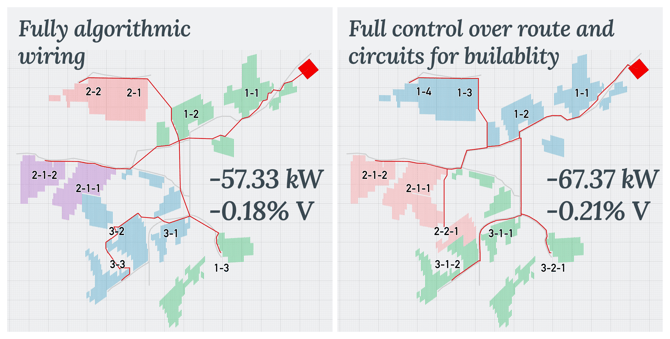
MV cable routing in PVFARM is now guidable: mark the points that matter — a specific corridor, a road crossing, a parcel boundary — and PVFARM routes the rest of the circuit optimally around those constraints. If no waypoints are set, generation works exactly as before.
- MV Waypoints: place waypoints in the scene to pin cable paths through specific locations. Waypoints are created in real time; the full MV layout updates when you hit Generate. They are listed on the MV panel alongside the wire hierarchy.
- Transformer pairing: define which transformers belong to the same MV circuit. Pairs are passed to generation and listed on the MV panel.
MV routing accounts for exclusion zones, equipment, and trackers when laying out cables.
Other Improvements
Piles Optimization
- Piles optimization algorithm has been reworked: It is now 1.5 - 2.5 times faster (both alone and as a part of Cut-Fill) preserving the same outputs quality.
Cut only/Fill only modes
- Now there is a choice whether to do Cut only or Fill only depending on the context.
Boundaries for all terrains
- Now it’s possible to create a boundary for all project’s terrains at once (it used to be just one)